Shuntline Hub · governance and experience, on your Snowflake
One front door: your data
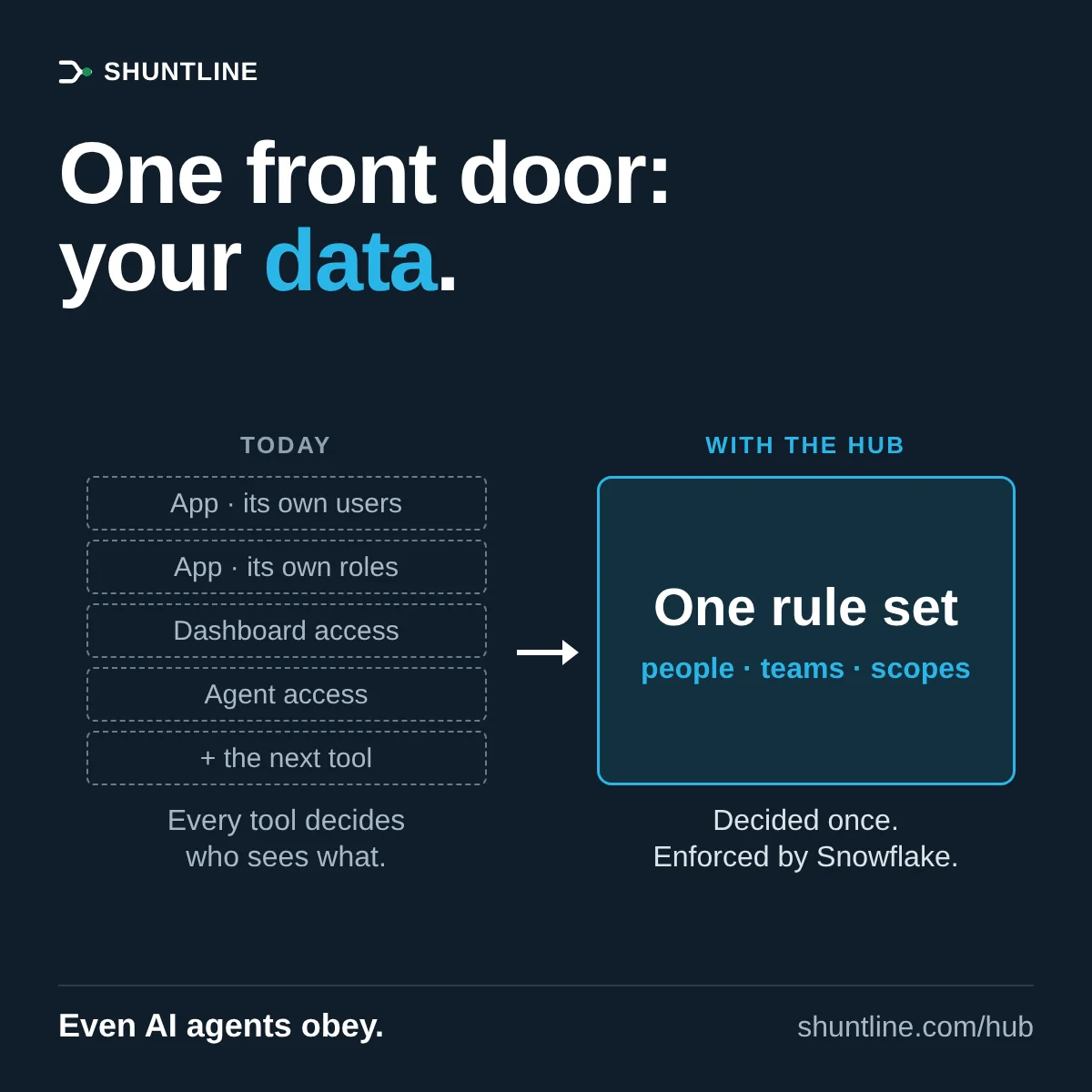
Shuntline Hub has two parts. A free Native App decides who can do what, once, for every solution and AI agent. A composable experience brings business users onto their data, with each solution keeping its own screens.
hub /hʌb/ · noun The centre of a wheel, where everything connects.
See it in 25 seconds
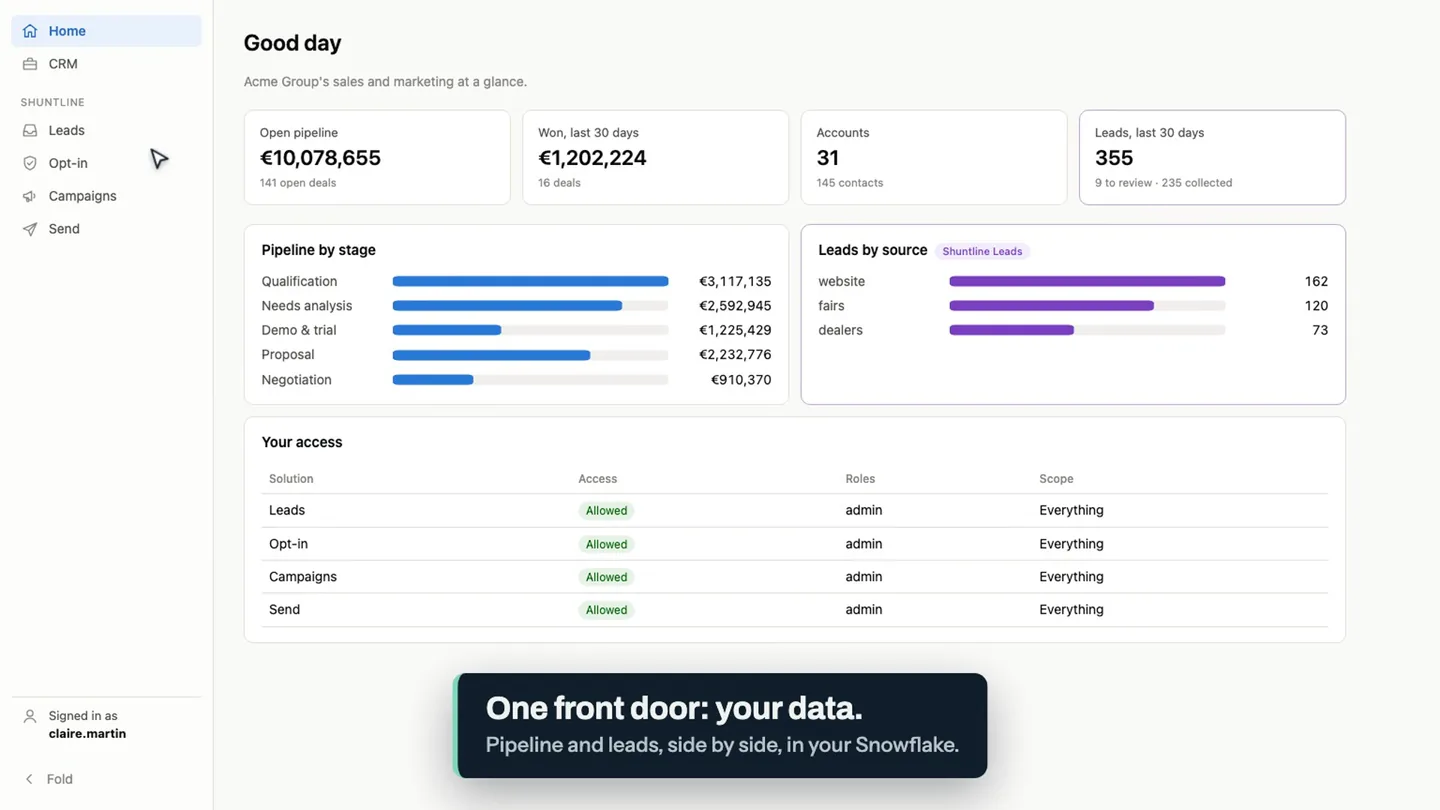
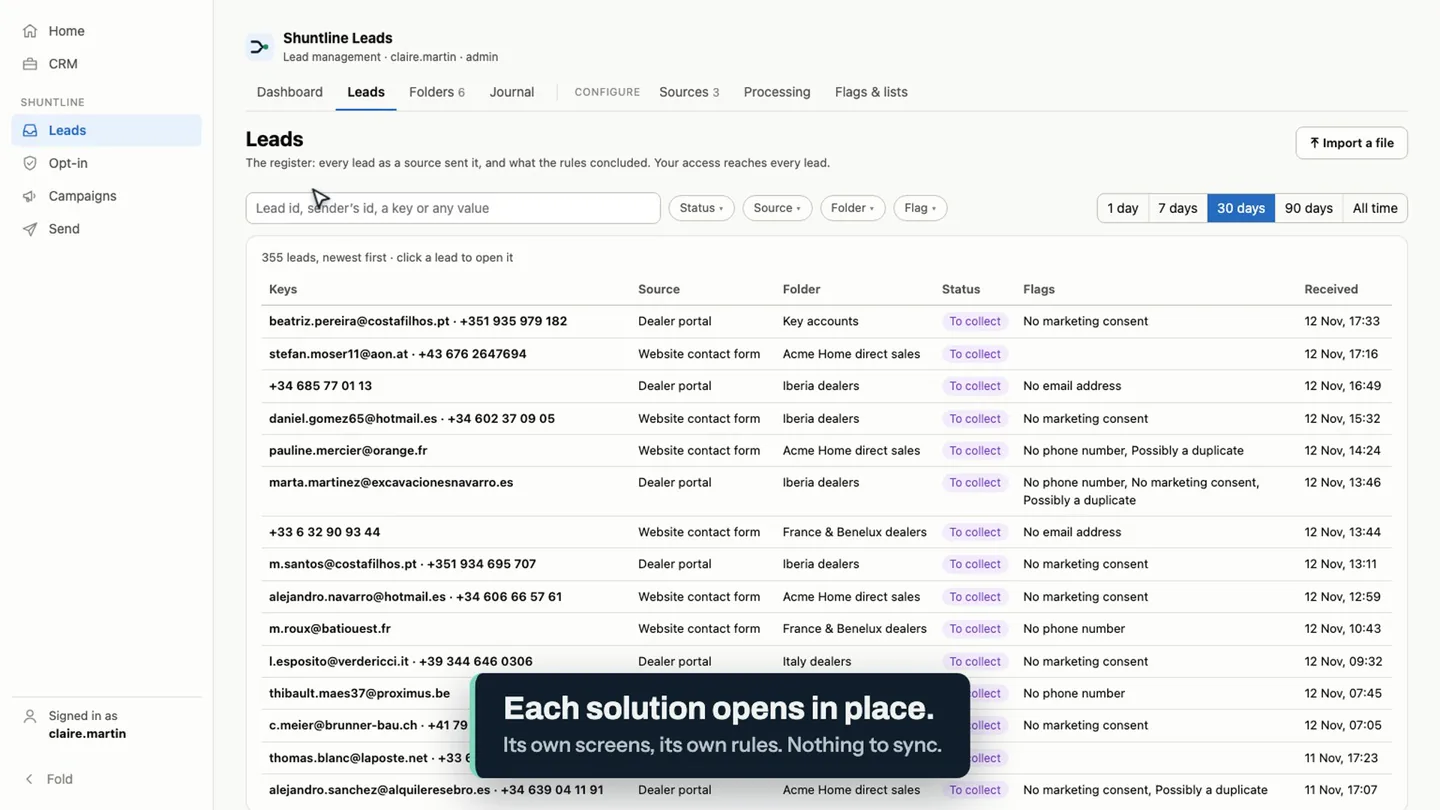
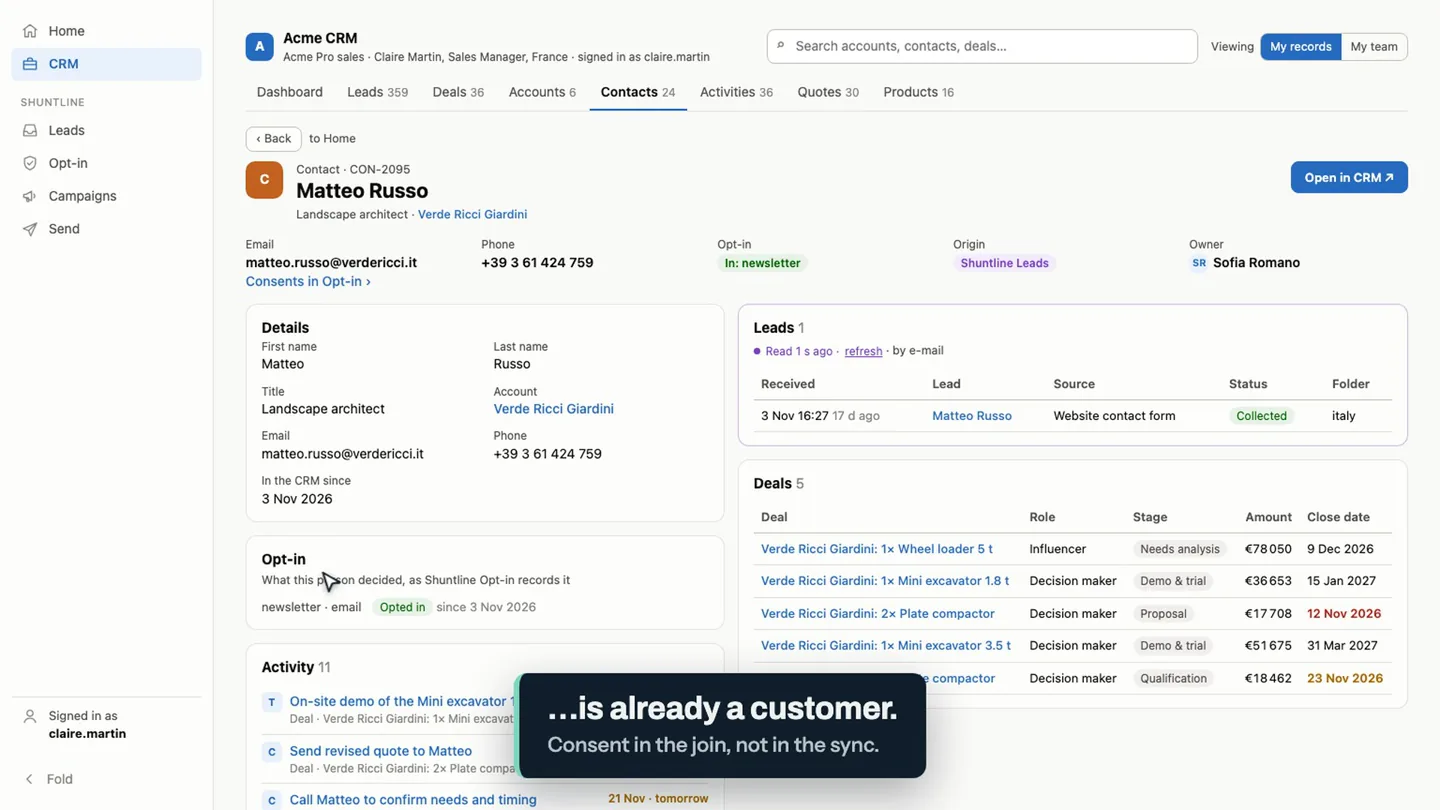
One front door on Snowflake: pipeline and leads side by side, each solution opening in place, a lead linked to its customer and to their consent.
copies to keep in sync
set of access rules, enforced by Snowflake
solutions, one front door
The demo runs on fictional data. Every screen is the real product.
Two parts, one front door
Governance decides who can do what. Experience is where people work. Both run in your Snowflake account, and Snowflake enforces the rules on every read and every write.
Who can do what
Teams, roles, data scopes, reviews and audit, decided once for every solution. A free Snowflake Native App, available on the Snowflake Marketplace.
Governance →A composable CRM
One web app that brings business users in: a home page, CRM screens, and each solution's own screens, linked to one another. Composed for your teams.
Experience →AI agents, same rules
Snowflake CoWork, Cortex Agents and MCP clients work on the solutions' data within each person's access.
AI agents →Who can do what, decided once
Snowflake authenticates people; the Hub authorizes them. Solutions store no users and no permissions of their own: they ask the Hub and apply the answer. The Hub is free and optional: you can keep your own access referential or Snowflake's native roles.
Solutions and my access
Each person sees the solutions they can open, with their role in each and a link to open them, and a “My access” page with their roles, data scopes and teams.
One console
Teams, people, roles and scopes per solution, the solutions catalogue, access reviews and the audit log, in one place, opened from Snowsight.
One question to ask
A new solution, standard or custom, is added from its description file, with no change to the Hub. Client libraries for Python and TypeScript, with caching built in.
Key capabilities
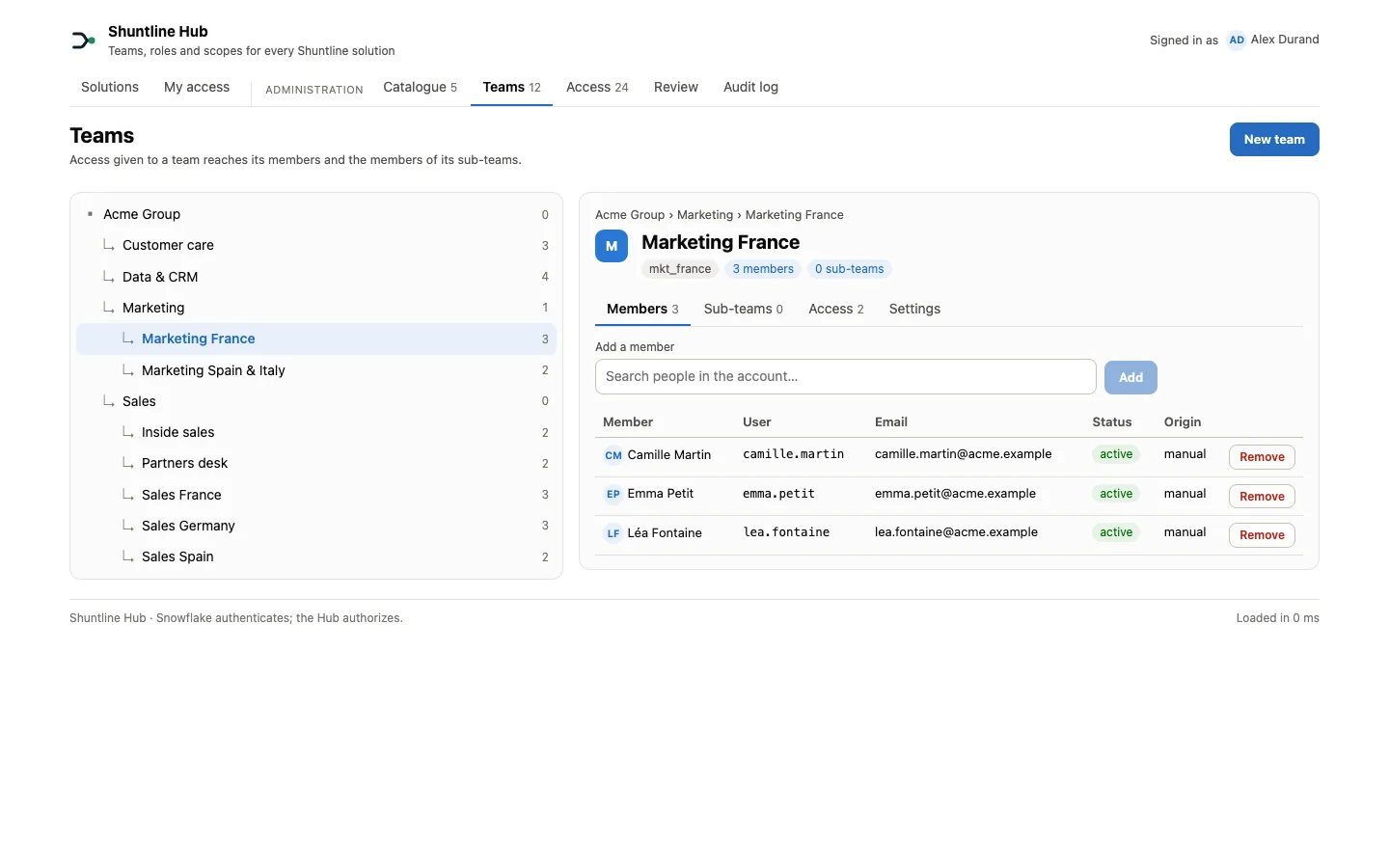
| Teams | Teams and sub-teams that mirror the organisation (Marketing › France, Sales › Spain). Access given to a team reaches its members and every team below it. |
|---|---|
| People and leavers | Follows your Snowflake account: someone disabled in Snowflake, or in the identity provider behind it, loses access to every solution at once. |
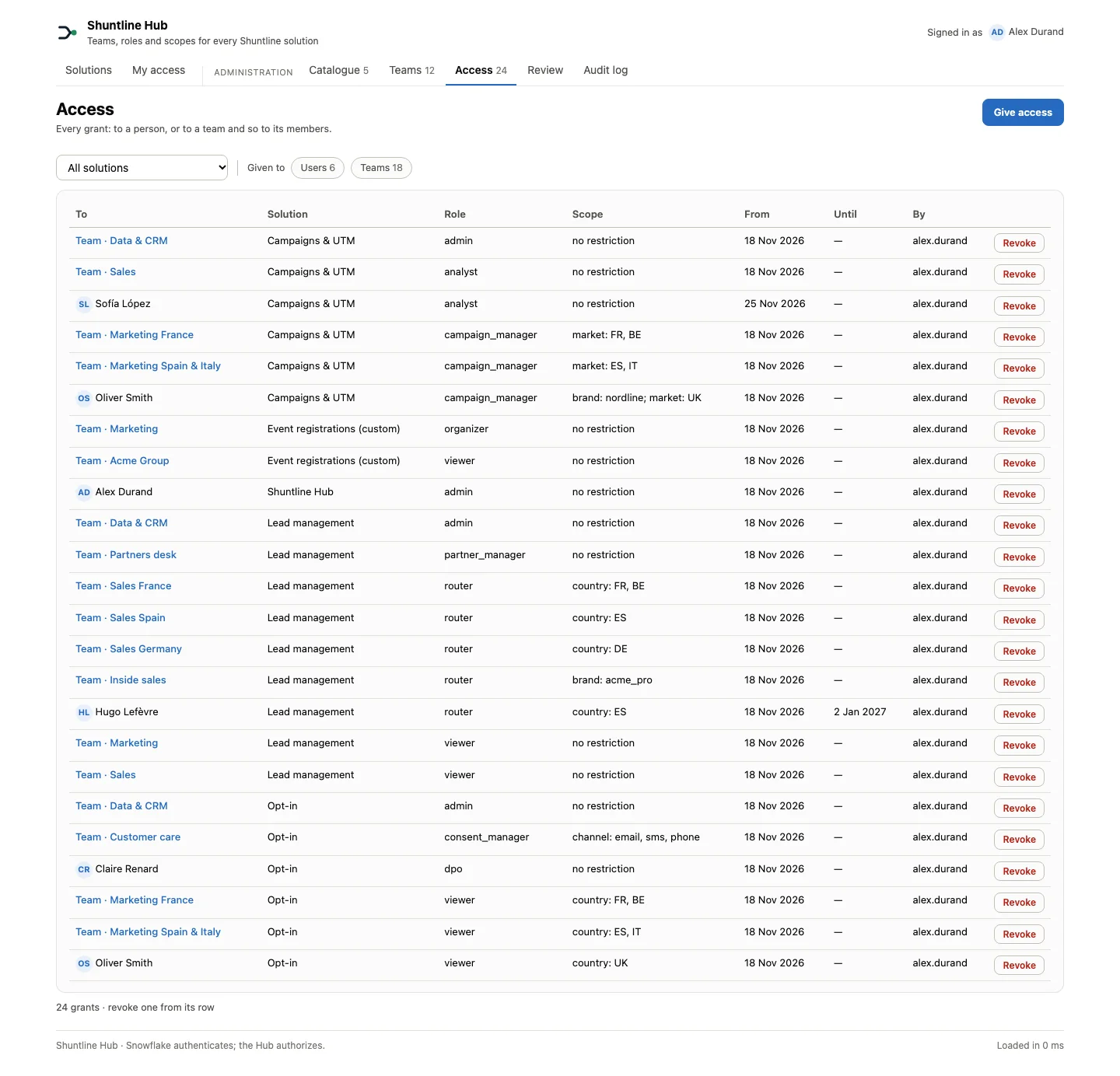
| Roles and data scopes | Each solution declares its roles (administrator, router, viewer…) and its scopes (country, brand, channel…). Access is a role, optionally limited to some scope values. |
| Dated access | Holiday cover that ends by itself, an agency whose access starts on its contract date. |
| Any solution instance | Add a solution from its description file, preview what an update changes, disable and re-enable it. Roles still held by people are never silently deleted. |
| Access review | Who has which access, through which team, exportable for periodic reviews. |
| Audit log | Every change, with who made it, when, and the before and after. Solutions add their own sensitive actions to the same log. |
How access adds up
One authorization layer that even your AI agents obey
Snowflake CoWork, Cortex Agents and MCP clients now work directly on company data. Each is a new way in. The Hub makes sure they follow the same rules as everyone else, with nothing to develop per agent or per solution.
Snowflake signs people in
Through your identity provider. Agents act as the person using them, never as a shared account.
The Hub decides
Teams, roles and data scopes, managed once, for every solution and every agent.
Snowflake enforces
On the solutions' data, every query, from a dashboard, SQL, an app or an AI agent, returns only what the person may see.
Ask across solutions
In Snowflake CoWork, a business user asks about leads, consents or campaigns and gets answers within their own scope. A sales manager for France sees French leads, nothing else.
Act through the solutions
Agents change data only through the solutions' own actions, exposed as tools through Snowflake's managed MCP server. Each action checks the Hub first and is recorded in the audit log.
Included, same rules
Solutions keep their operational records in hybrid tables, in Snowflake itself, so analysis and AI read them in place, under the same rules.
A composable CRM, on your data
One web app in your Snowflake account composes the screens business users need. Each part keeps its data where it is and its own rules. Nothing is copied into a new tool.
Shuntline Hub
The menu shows a solution when the Hub gives the person a role in it.
Their own screens
Leads, Opt-in, Campaigns and Send open in place, each with its own screens and its own rules.
Tables you already sync
Accounts, contacts and deals landed in Snowflake from Salesforce or another CRM, read as the person.
Custom objects
Your own tables: fleets, contracts, sites, scores. Shown as lists, fields or related lists.
Reads and writes under their name
The web app holds no data and no business rule. Every read runs as the person signed in to Snowflake, and every change goes through the solution that owns it.
Specialized screens, one whole
Each solution keeps a deep, coherent interface of its own. Deep links connect them: a lead to its contact, a contact to their consent.
Add a part, the menu follows
Adding a solution adds its screens. Removing someone's role removes them everywhere at once. Each solution still works alone.
The experience is delivered as a service package, composed with you on top of the free Hub: Pricing & Services → · Architecture →
How it fits
Questions about the Hub
Short answers to what CRM owners, Snowflake administrators and security teams ask first.
What are the two parts of Shuntline Hub?
Governance and experience. Governance is a free Snowflake Native App that decides who can do what, once, for every solution and every AI agent. Experience is a composable web app, tailored with each customer, that brings business users onto their data: a home page, CRM screens, and each solution's own screens linked together.
What is a composable CRM experience?
A CRM experience assembled from parts that each stay where they are in your Snowflake account: Shuntline solutions, the CRM tables you already sync from Salesforce or another CRM, and your own custom objects. One web app composes the screens and reads everything as the person using it. Nothing is copied into a new tool.
Is the experience part of the free Native App?
No. The governance app is free on the Snowflake Marketplace. The experience is deployed in your own account and tailored with each customer. Each solution still works alone, with its own console.
Does any of our data leave our Snowflake account?
No. The Hub runs inside your account, with no container and no outbound connection. We have no access to your data.
Do we manage another set of passwords?
No. People sign in to Snowflake, usually with your company's identity provider. The Hub never sees a password.
What happens when someone leaves?
Disabling them in Snowflake, or in the identity provider behind it, blocks their sign-in at once, so they lose access to every solution. The Hub then marks them disabled in its records, reviews and exports, with no manual step.
Can an AI agent see more than the person using it?
No. Agents act as the person using them, Snowflake applies the Hub's decisions on every query, and agents change data only through the solutions' own actions, which check the Hub first and are recorded in the audit log.
Can we give access for a limited time?
Yes. Each grant can have a start date, an end date, or both.
Can we limit someone to some countries or brands?
Yes, if the solution declares that scope. Scopes from several grants add up.
Can we audit who changed what?
Yes. Every change is recorded with its author, time, and before and after values, in your account.
Does it work with custom solutions?
Yes. Any solution that ships a description file and asks the Hub through its contract is added with no change to the Hub.
What about tools outside Snowflake, like a CDP or the CRM?
The experience links down to them, and solutions send them what they need to act, such as an audience or a converted opportunity. Access inside those tools stays governed by the tools themselves.
What does it cost?
The Hub is free. Like any Native App it runs on your Snowflake resources: a small warehouse billed by Snowflake, used only while the console is in use. Nothing runs on a schedule.
Do we have to use the Hub?
No. The Hub is a free, optional accelerator, delivered as a Snowflake Native App. Solutions also work with your own MDM or access referential, or simply with Snowflake's native roles when the use case doesn't call for teams and data scopes.
See your organisation in the Hub
Bring the teams and roles you manage today across your solutions. We set them up in the Hub live, in a Snowflake account, and walk your administrators and security team through the architecture.
- A working session with the team that builds it
- Your teams, roles and scopes, set up on the spot
- Security review material on request