
Shuntline›CRM Insights
CRM Insights · an automated audit, shared in your Snowflake
What should leave your CRM, and what it saves
insight /ˈɪnsaɪt/ · noun The point where a hunch becomes evidence. Which entities never belonged in Salesforce, why, who touches them, and what moving them saves.
CRM Insights is an automated audit of your Salesforce org. It detects the entities that do not belong in a system of engagement, explains why, and prices what they carry: seats, automations, integrations, storage. It also names the technical debt around them: cold code, cold flows, dead processes, fields a layout asks for and nobody fills. The findings land as native tables in your Snowflake account, so every team reads the same evidence, and the debt curve can be proven to bend.
The problem
More in the CRM than it should hold
Over the years, every record that needed a home ended up in Salesforce: leads, consent, campaign catalogues, partner lists, pricing tables. Each one brought its objects, its triggers, its integrations and its seats. Nobody can see how much: the evidence is scattered between Setup, event logs and a contract PDF, and no one team holds the whole picture.
Referentials disguised as CRM objects
Cross-company lists, worked mostly by automation and read far more than written, modelled as custom objects with record types, sharing rules and a copy per business unit.
- dead processes and zero-record record types
- ghost records whose stage no longer exists
- one copy per business unit, no group-wide list
Seats, automations, integrations
Every reader of a reference table holds a licence. Every sender maintains an integration into the org. Cold code and cold flows keep running, and keep being paid for.
- read-only populations on full seats
- one integration per sender, per object
- triggers and flows nobody owns any more
Who actually works these records
Provisioned, assigned, logged-in and active are four different numbers. Record desks, read-only consumers, dormant users and integration users are mixed in the same count.
- editors vs readers vs record desks
- daily, weekly, monthly, infrequent
- contract lines vs what the org shows
With Shuntline
What the audit tells you
Everything resolves to the entity: an object and its record types, with their automations, their users and their share of the contract. Each one is scored against the pattern that says whether it belongs in a system of engagement or next to the warehouse.
The entities that should move
Objects scored on three criteria: shared across the company, worked by automation, read far more than written. Dead processes, empty record types and ghost records are flagged on the way.
Evidence, not opinion
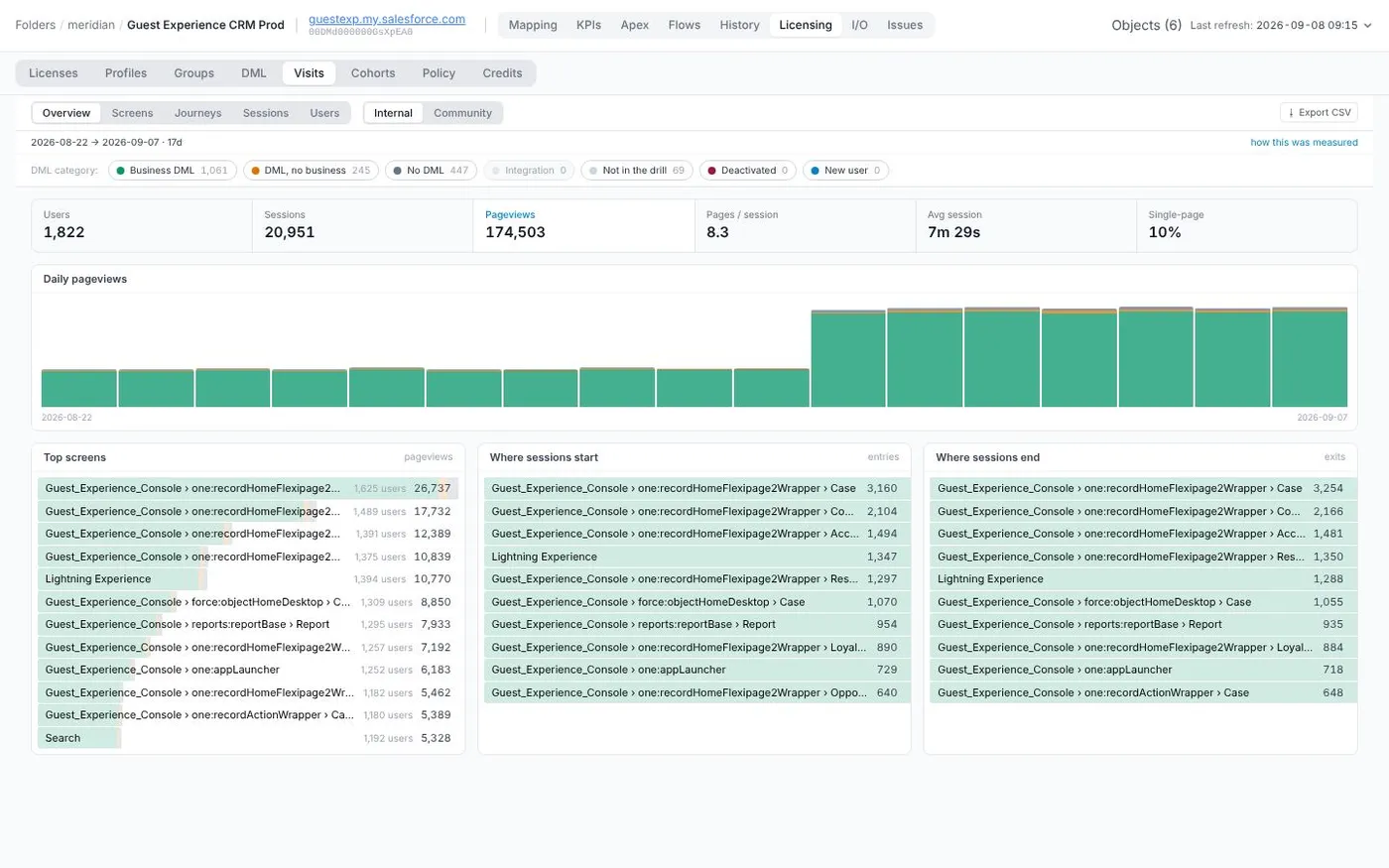
Per entity: the triggers and flows attached, who creates and who only reads, the integrations in and out, the data operations measured from event logs rather than logins.
What each entity carries
Seats by population, integrations per sender, cold code and cold flows, storage. Priced from your contract lines, so the number is the one procurement recognises.
Who could leave the CRM
Provisioned, assigned, logged-in and active on one scale. Readers who need a referential and not a CRM seat, record desks who need a small app, dormant users who need nothing.
The technical debt, named
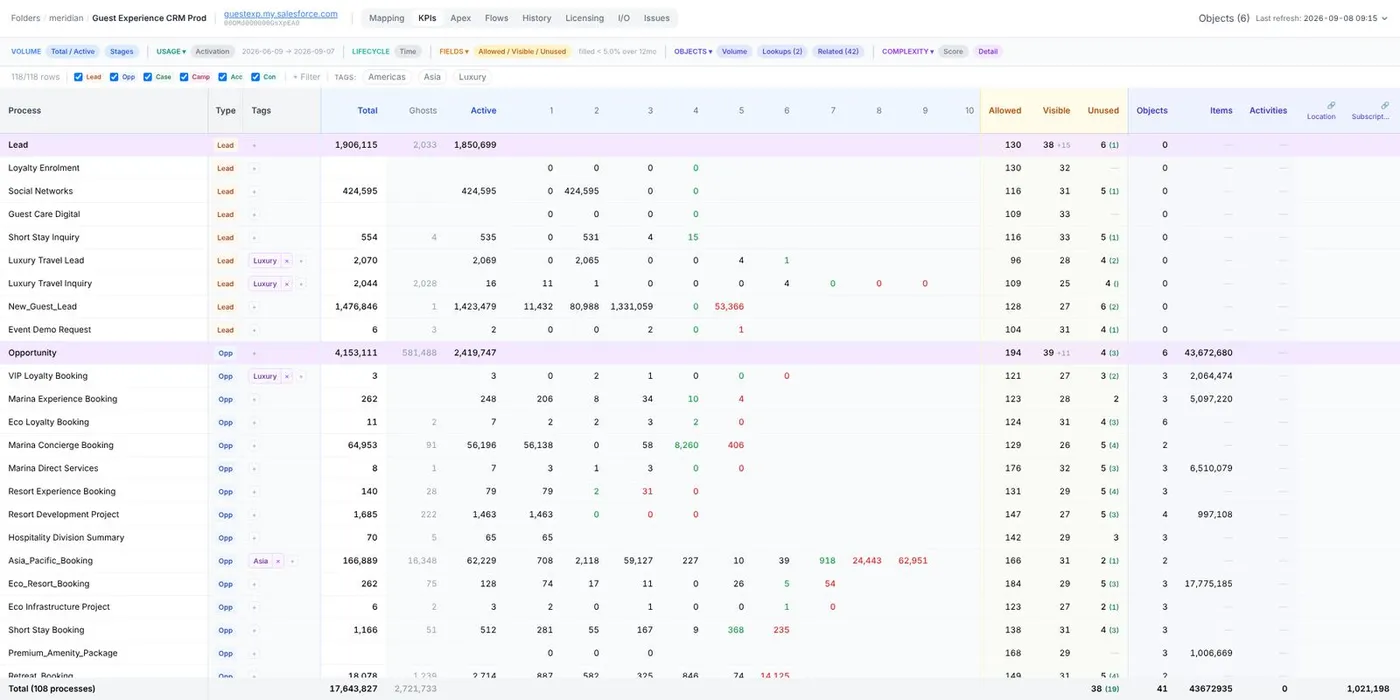
Moving an entity out is also a clean-up. The audit lists what goes with it and what stays behind for no reason: Apex classes with no observed execution in the window, flows deployed and never run, Process Builder still standing, fields a layout asks for that nobody fills, record types with zero records, ghost records stranded on retired stages. Deletion candidates from the org's own logs, not from a grade.
A number your architect can recompute
Every process carries a complexity score that is a plain sum of counts, stages, profiles, layouts, pages, flows, triggers, rules, and each cell opens the items it counted. Snapshot over snapshot, the score falls as the debt is removed, and the drop has a date on it.
What moves, what stays
The audit's conclusion, drawn. Today the CRM sits at the centre: every sender, every reader, every record desk and every copy of reference data goes through it. With Shuntline, what is upstream goes back upstream: the entities become referentials next to the warehouse, served by small apps, and the CRM keeps engagement.
Today. The CRM is the centre of everything. Senders integrate into it one by one, leads, consent and campaigns live there as custom objects with their own triggers, reference data is copied in, and everyone who works or looks at a record holds a seat. The warehouse only serves analytics.
Illustrative composition. Savings are measured in a pilot, at your contracted rates, and netted against Snowflake compute and the subscription.
From a finding to a new home
An entity that should leave the CRM needs somewhere to go. Each Shuntline solution is such a use case, extracted from the CRM and given a small app in your Snowflake account. Where the catalogue does not fit, a custom solution is co-designed on the same skeleton. Some of those custom solutions surface here, in the catalogue, once the record proves common enough; others stay private to the customer who asked for them.
All solutions, native apps and custom solutions: Solutions →
A first run within the week
One subscription per org. Read-only access through the Salesforce CLI, the contract lines, the event logs you already keep. First findings within the week.
Candidates, priced
Each entity that should move, with its users, its costs and the solution that would take it. Pilot it yourselves, or ask us to.
Prove it fell
As often as you like. Seats, objects and integrations compared run to run, in the same tables, for every team to see.
CRM Insights builds on the Salesforce audit engine of Stood, our parent product line; Shuntline adds the Snowflake sharing and the solutions that give each finding a new home. About us →
Questions about CRM Insights
Short answers to what architects, CRM owners and marketing ops ask first. Everything here is also in the pages above, in more depth.
What does the audit detect?
Every object and record type in the org is scored against the pattern: shared across the company, worked by automation, read far more than written. Dead processes, empty record types and ghost records are flagged. For each entity the audit lists the automations attached, the integrations in and out, the users who create versus only read, and the data operations measured from event logs.
What does it cost the customer to leave things in the CRM?
Seats held by read-only populations and record desks, one integration per sender into the org, cold code and cold flows still running, storage. The audit prices these from your own contract lines, so the figure is the one procurement recognises. CRM Insights itself is a subscription priced per org.
Where does the audit run, and where do the findings go?
The audit runs read-only from a desktop application on the analyst's machine, through the Salesforce CLI: metadata and logs never leave your perimeter and no cloud service sees your org. The findings stay on that machine by default. Turn on sharing and they are published as native tables in your Snowflake account, where teams read them with dashboards, join them with usage and ERP data, and question them with Cortex Agents, or to your own AWS S3 bucket.
How is this different from a one-off consulting audit?
It is a toolkit you subscribe to, not a study you buy. The same tables are refilled at every run, so after each entity moves out of the CRM the drop in seats, objects and integrations is a query over two runs rather than a new engagement. First run within the week, then as often as you like.
What happens to an entity that should move?
It needs a new home. Each Shuntline solution is such a use case, extracted from the CRM and given a small app in your Snowflake account; where the catalogue does not fit, a custom solution is co-designed on the same skeleton. Some of those custom solutions surface here, in the catalogue, once the record proves common enough; others stay private to the customer who asked for them.
See CRM Insights on your org
Bring read-only access to a sandbox or the org, your contract lines and a month of event logs. We run a first pass with you, share the findings where you choose, and walk the candidates through.
- A working session with the team that builds it
- Your entities scored, priced and attributed to the users who touch them
- Snowflake architecture, security and hosting questions answered