
Shuntline›Solutions›Lead management
Shuntline Leads · lead management in your Snowflake account
Every lead, filed where it belongs
shunt /ʃʌnt/ · verb To move a rail car from one track to the track it needs. Shuntline does it for leads.
Shuntline Leads gathers every source's leads upstream of the CRM: stored as sent, cleaned and checked by rules your teams edit, deduplicated, and filed for the team or system that acts on them. All of it inside your Snowflake account, where each lead's context already is; Salesforce collects only the leads worth a seller's time.
The problem
The CRM carries the plumbing, and pays for it
In most enterprise CRMs, Salesforce included, the lead object is one of the most customised in the estate. Yet few people actually work leads there. Most of a lead's life is receiving, checking, routing and handing off, between systems. Shuntline moves that work out of the CRM.
Every new channel is a project
A new form, partner or event means new fields, layouts and a release before the first lead can land.
- fields per channel and partner
- record types per business line
- staging objects for imports
Routing hides in triggers
Assignment rules, flows and code fire on every insert. Nobody can say in one sentence why a lead went where it went.
- assignment rules and queues
- flows and triggers on insert
- integration users
Licences for systems talking to systems
Partners, dealers and reporting users need access to leads, not to a CRM. Each one is still a seat, a profile and a permission set.
- partner and community seats
- read-only reporting users
- middleware field mappings
With Shuntline
Salesforce stays the destination
Salesforce, or any other CRM, is where your sellers and service teams engage with customers. Lead dispatching is a different job: taking in many senders, each with its own data model, and passing their leads on. That job does not need a CRM. Lead management takes it out of the org and into Snowflake, where the lead's context already is: ERP status, product usage, marketing touches, CRM history, read in place from curated datasets. Salesforce collects its folder, exactly once: only the leads worth a seller's time reach the org.
People working customers
Accounts, contacts, opportunities, cases, activities. A stable model that sellers, managers and service teams use every day.
- one model, governed by your CRM team
- licensed per user who works in it
- changes go through a release cycle
Systems passing leads on
Web forms, partner feeds, event exports and campaigns, each sending its own fields. Most of the work is checking and routing, with no person involved.
- as many data models as there are senders
- new senders every month, no release needed
- partners and dealers served without CRM seats
- AI agents served over MCP, without seats either
No intermediate object
The lead stage happens before the org: no fields, record types, staging objects or conversion logic per sender. Assignment rules and insert triggers for dispatching come out too.
One door into Salesforce
Instead of one integration per sender, Salesforce collects one folder, exactly once. The inbound sync shrinks to what CRM processes need. New senders connect to the app, not to the org.
Bulk traffic stops upstream
Retried deliveries, duplicates and incomplete payloads are handled before Salesforce sees them. Fewer API calls, less storage, no automation firing on leads nobody will work.
Easy to route elsewhere
Dealers, partners, marketing tools and AI agents take their leads straight from a folder. No Experience Cloud licence or extra integration user each.
What it does
Shuntline Leads takes in leads from every source, tidies and checks them with rules the business edits, finds duplicates, and files each lead for the team or system that acts on it, entirely inside your Snowflake account.
Any source, any shape
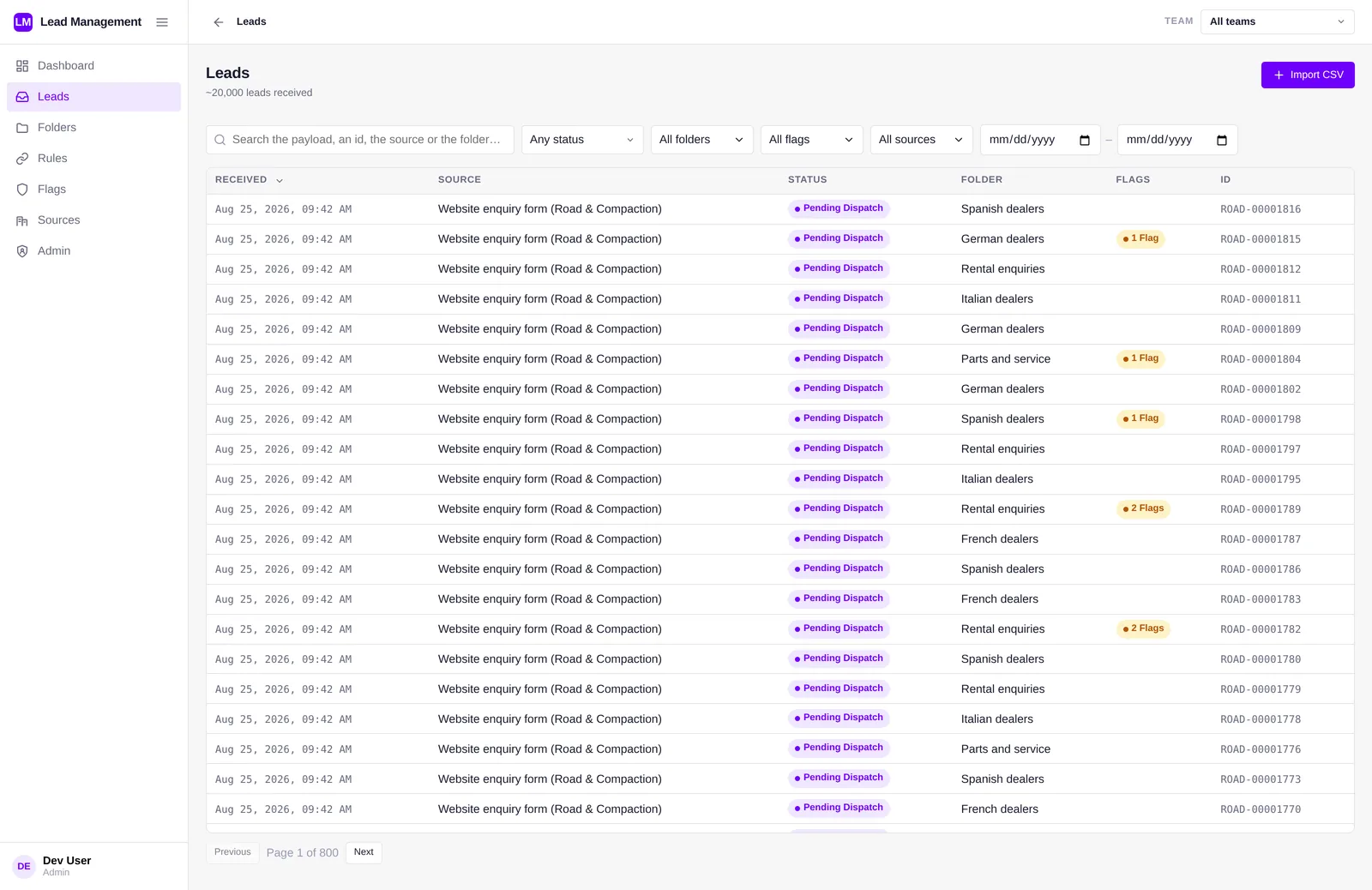
Web forms, trade fair scans, partner portals, imports: each sends leads in its own JSON. A source declares the fields that identify a lead and the fields that scope access.
Nothing lost, nothing rewritten
Every lead is stored exactly as sent. Rules and people add revisions beside it; the original stays readable.
Edited by the business
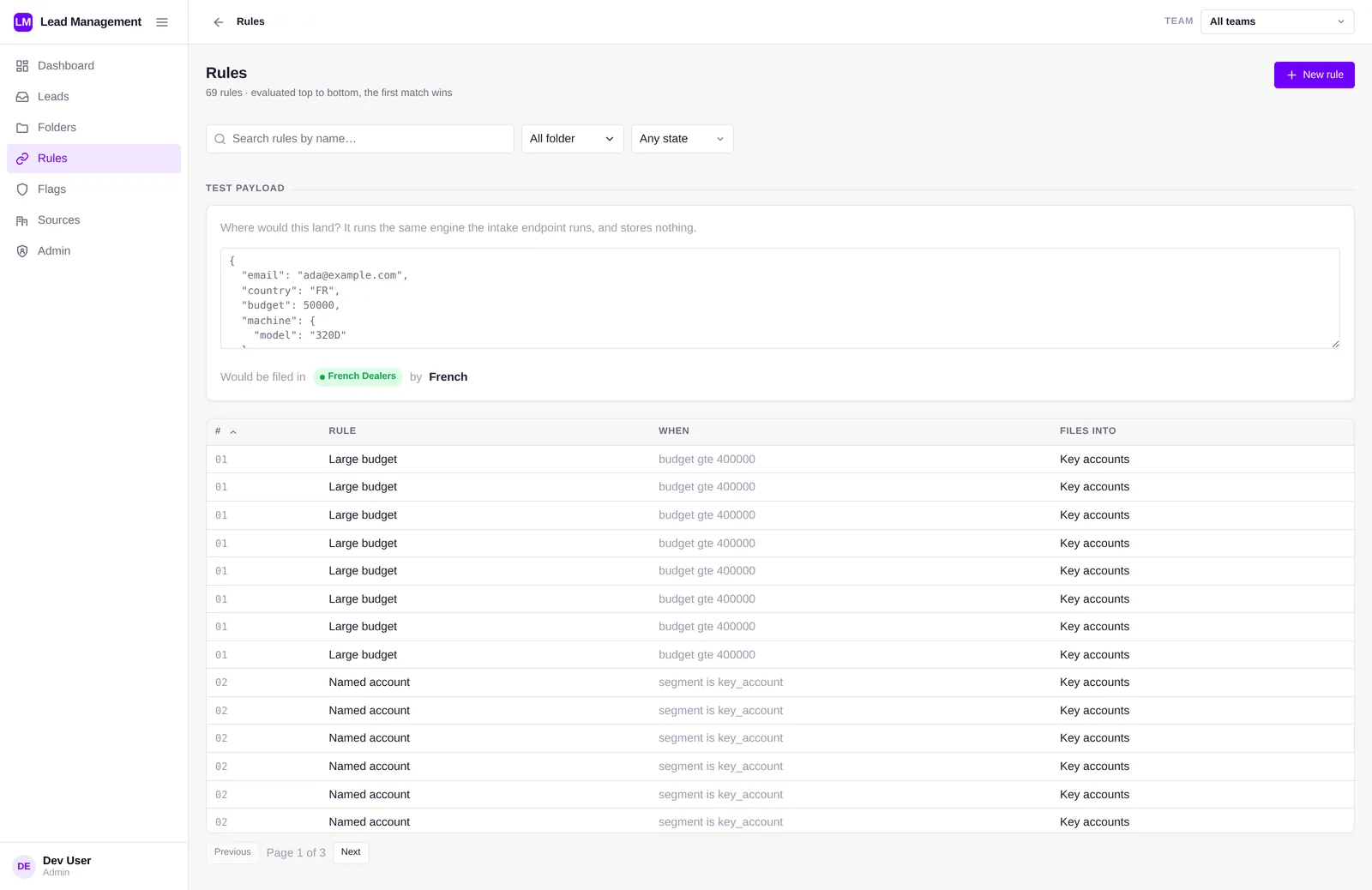
Per source, in five steps: formatting, validation, enrichment, dedup, dispatch. Any payload can be tried against the rules before they go live.
Found, not merged
The same person across sources and time windows is linked and flagged; both records stay.
Filed for the right team
The first matching rule files the lead into a folder: a dealer network, a sales team, key accounts. Leads no rule matches wait for a person.
Collected exactly once
Authorised systems, a CRM or a dealer extranet, claim a folder's leads and acknowledge what they stored. Two systems never take the same lead.
How a lead travels
Five steps, each inspectable afterwards. Shuntline is the part of the chain that remembers.
- 01 · ARRIVE
It arrives
A source sends it through the Snowflake SQL API or any driver. It is stored as sent before anything reads it.
- 02 · CHECK
It gets checked
Formatting, validation and enrichment; email and phone keys checked. Flags record what is missing, such as no consent.
- 03 · MATCH
Duplicates found
The same person across sources and time windows is linked and flagged, never merged.
- 04 · FILE
It gets filed
The first matching rule picks a folder. When none matches, the lead waits for a person.
- 05 · HAND OVER
It is collected
Its folder's system claims it, stores it and acknowledges it. Every hand-over is recorded.
A console in Snowsight
People work where the data is, with Snowflake's own sign-in: dashboard, register with filters and search, each lead with its keys, checks, revisions, duplicates and hand-overs; sources, rules, flags and lists; an intake journal and an audit trail.
Two application roles
One for people and their AI agents, one for the systems that send and collect. Granted by your Snowflake administrator; works at once after install.
Roles per team and scope
Administrator, router, viewer, sender, collector, each limited if needed to a source, a country or a brand. The same rule applies to the console, the API, intake, collection and AI agents.
A sample company
One click loads a fictional company: three sources, six folders and about 430 leads over 30 days, to see every screen at work before going live.
Fits the rest of your stack
Systems send and collect through Snowflake's own API; AI agents read and act within each person's access; the rest sits next to the app.
Snowflake SQL API
Any system sends leads through the Snowflake SQL API or a Snowflake driver, one at a time or up to 2,000 at once. A repeat of the same lead is recognised, never stored twice.
Partners without Snowflake credentials
SaaS forms and partner feeds come through your API gateway in front of the SQL API, where partner keys, rate limits and signatures are checked.
Folder collection
A CRM or extranet claims its folder's leads on its own schedule and acknowledges what it stored. A system that fails mid-way gives its leads back.
Webhooks, next to the app
A small job claims, posts to the webhook and acknowledges, following the rules documented with the app.
Cortex Agents and MCP
Agents read a governed view of the leads and act through the same procedures as people, as the person using them.
The API, examples and integration patterns, in the documentation →
In your Snowflake account
A Snowflake Native App, available on the Snowflake Marketplace: it runs entirely inside your account, with no container, no external connection and nothing on a schedule. An idle install costs nothing.
Hybrid tables
Leads, revisions, dedup keys and hand-overs: row locks and enforced unique keys, so concurrent senders don't slow each other and a repeat of the same lead is refused by the database.
Typed where it matters
Each source keeps its JSON shape; status, folder, dates, keys and scope are indexed at intake, so lists and filters stay fast as the register grows.
Already a dataset
A read view puts every lead next to the rest of your Snowflake data, for dashboards, Snowflake CoWork and Cortex Agents.
What it will not do
A short list of boundaries keeps it simple to run and easy to trust.
Rewrite what was sent
Rules and people add revisions; the original stays exactly as sent.
Merge records
Duplicates are linked and flagged for a person or an agent to decide.
Replace your gateway or ETL
Partners without Snowflake credentials go through your gateway; webhooks are a small job next to the app.
Leave your account
No container and no external connection: nothing is sent anywhere.
Goes further with
Shuntline Leads stands alone. Joined to the other upstream objects in the warehouse, a lead arrives with its consent known and its campaign attributed.
Questions about Shuntline Leads
Short answers to what CRM owners, marketing ops and architects ask first. Details are in the documentation.
What is Shuntline Leads?
A Snowflake Native App that takes in leads from every source, stores them as sent, cleans and checks them with rules your teams edit, finds duplicates, and files each lead into the folder of the team or system that acts on it, inside your Snowflake account.
Which sources can send leads?
Web forms, trade fair scans, partner portals and imports, each in its own JSON shape, through the Snowflake SQL API or any Snowflake driver. Partners and SaaS forms without Snowflake credentials come through your API gateway in front of it.
How does Salesforce get its leads?
Salesforce, or any CRM or dealer extranet, collects its folder: it claims the waiting leads, stores them and acknowledges them. Two systems never take the same lead, and a system that fails mid-way gives its leads back.
Are duplicates merged?
No. The same person across sources and time windows is linked and flagged; both records stay, for a person or an agent to decide.
Can AI agents work leads?
Yes. Cortex Agents and MCP clients read a governed view of the leads and act through the same procedures as people, as the person using them.
Do we need Shuntline Hub?
No. The app's two roles work at once after install. Shuntline Hub, free and optional, adds roles per team and data scopes such as a country or a brand.
Where is the technical documentation?
On the Shuntline Leads documentation page: installation and privileges, the API with examples, access roles, integration patterns and architecture.
Route your own leads in a demo
Bring a few real payloads. We run them through intake, flags and rules live, and show where each one would land and what reaches Salesforce.
- A working session with the team that builds it
- Your payloads, tried against the rules before anything is stored
- Snowflake architecture, security and hosting questions answered