
Shuntline›Solutions›Campaign referential & UTM
Campaign referential & UTM · runs in your Snowflake account
One campaign catalogue, every business unit
referential /ˌrefəˈrenʃəl/ · noun The one list a group agrees to name things by. Campaigns, codes and UTMs, minted once and resolving forever.
Campaigns is the referential a group needs across all its business units: who runs which campaign, in which market, with which code, budget and readiness. UTM links are generated from one convention and never hand-written. Execution stays on the marketing platforms; attribution becomes a join in the warehouse, because the referential already lives there.
The problem
Every platform names campaigns its own way. None of them is the referential.
Marketing Cloud, the ad platforms, the events tool and Salesforce each name campaigns their own way. Spreadsheets reconcile them after the fact, and attribution becomes a project every quarter. A group needs one place where a campaign is defined once, coded once, and the code travels into every platform and comes back on every lead and every click.
Names that drift
The same launch is "Q3-FR-Launch" in one tool and "fr_launch_q3" in another. The warehouse cannot join what was never named the same.
- one naming per tool and per team
- hand-typed UTM parameters
- codes edited after going live
No group view
Each BU plans in its own file. Budget, status and readiness across the group are assembled by hand, late.
- no shared statuses or types
- no readiness before launch
- no roll-up by market
A seat for a catalogue
Using the CRM's campaign object makes every planner a licensed user and every ad platform an integration, for what is a reference table.
- campaign members as CRM rows
- attribution in CRM reports
- marketing ops on CRM seats
With Shuntline
What the referential holds
Access follows your roles: with Shuntline Hub, each person's reach can be limited to business units, markets or campaign types. Business units group campaigns; campaigns carry the fields a group plans by; each campaign owns its tracking links. Nothing is permanently removed: archive is soft and restorable.
The top level
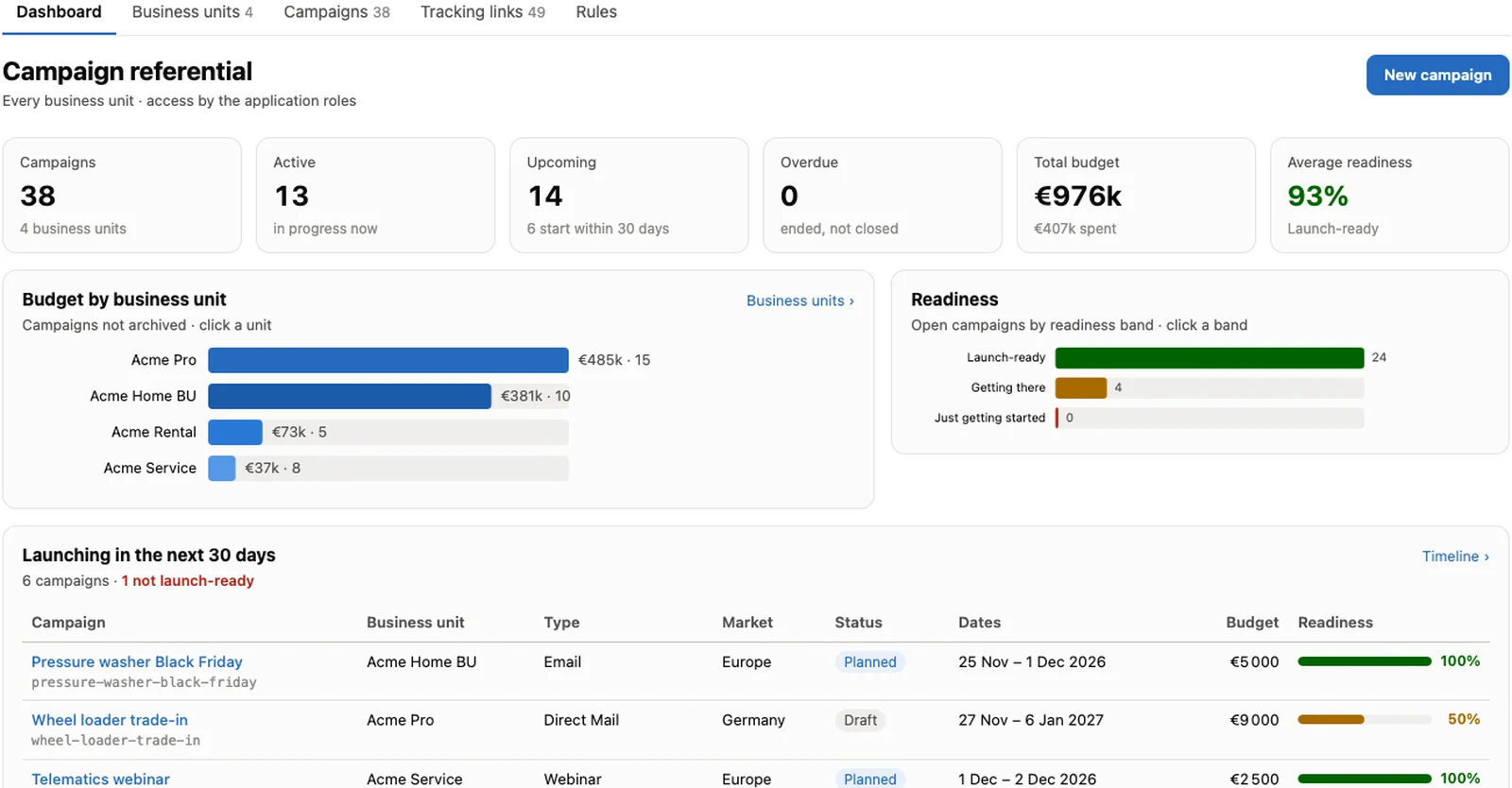
A product line, a region, a brand. Name, owning team, tags, status, and a roll-up of its campaigns: active, upcoming, completed, overdue, total budget, average readiness.
Defined once
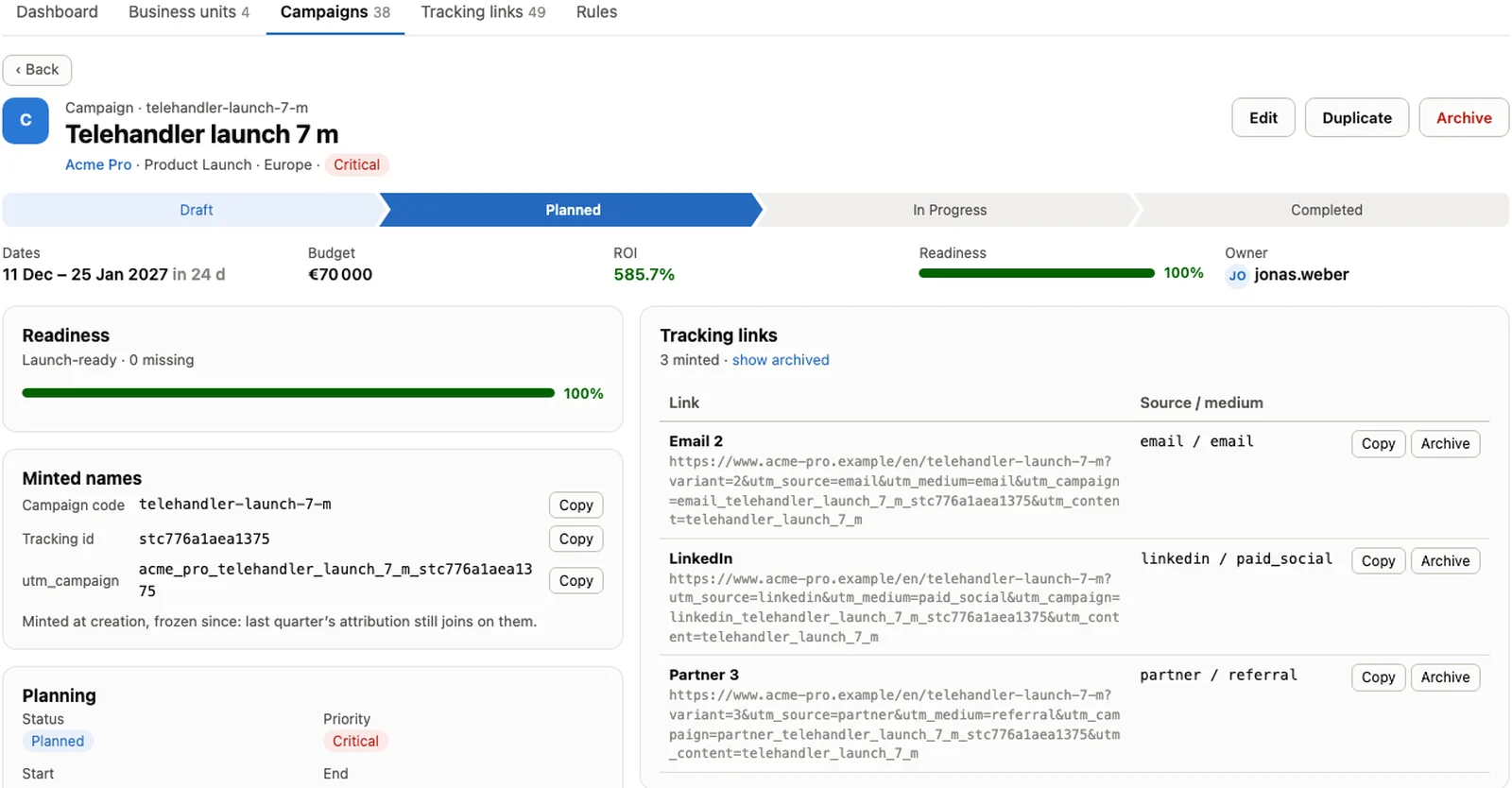
Name and a code generated from it, frozen once created. Type, market, status, priority, objective, dates with time zone, channel, audience, tags, budgeted and actual cost, expected revenue, ROI and duration derived.
A score before launch
A checklist per campaign: objective, dates, budget, a tracking link, a target audience, a status. Below 50% "just getting started", 80% and above "launch-ready". Checks that do not apply to a type are skipped, and the bands are yours to move.
Business rules, not releases
Types, channels, currencies, which fields show for which type, readiness checks, labels: changed by an administrator, validated whole, applied immediately. Shipped defaults stay visible beside what you customised.
UTMs minted, never typed
A tracking link is a destination URL and a channel. Source and medium come from the channel; the campaign name and link name come from templates built from business unit, campaign, type, market and a tracking id, the unique id that ends every UTM name and that attribution resolves on. Once generated, a name is frozen: a UTM already live in an ad or an email must keep resolving.
Eleven out of the box
LinkedIn, Email, paid search, Facebook, Instagram, X, TikTok, QR code, SMS, WhatsApp, Partner. Each sets utm_source and utm_medium; "Other" takes a custom pair.
One convention for the group
Separator, prefix, tracking-id length, and ordered segments for the campaign name and the link name. A live preview, computed by the same code that mints, before you save.
Copy and paste
Live preview with warnings, Copy URL, read-only on the record. The planner never hand-writes a UTM parameter.
The referential as a table
In Snowflake, campaigns and their UTMs are a dataset. Web analytics, ad-platform exports and the leads that come back join on the code the referential minted; one function resolves any UTM value back to its campaign.
The SQL API, the tables and examples, in the documentation →
Defined here, executed there, attributed on the code
The referential does not send, bid or publish. Marketing Cloud and the other downstream solutions do what they are built for, with the campaign code and UTMs the referential minted. Because the referential is a dataset, audiences are built from accurate data and pushed by reverse ETL, and the loop closes with a join on the code rather than a reconciliation.
One dashboard across BUs
Total, active, upcoming and overdue campaigns, total budget and average readiness, by business unit, type and market.
Planners plan, admins set the rules
A planner creates within their scope and edits what they created; an administrator edits any record of their scope and the rules. Without Shuntline Hub, the app's three Snowflake roles decide.
Codes that keep resolving
A rule change applies to future campaigns and links only. Existing names never change, so last quarter's attribution still joins.
Not in the console
Database, hosts, secrets and API keys are deliberately absent from the admin screens. No browser session can reach them.
Goes further with
The referential stands alone. Joined to leads and consent in the warehouse, a campaign knows who it brought in and who it may contact.
Questions about the campaign referential
Short answers to what architects, CRM owners and marketing ops ask first. Tables, SQL API, examples and access are in the documentation.
What is Shuntline Campaign referential & UTM?
One campaign catalogue for a whole group, across business units, running in your Snowflake account. A campaign is defined once with a code that is frozen once created; UTM links are generated from one convention, never typed; a readiness score says whether a campaign can launch.
Does it execute campaigns?
No. Marketing Cloud and the other downstream solutions send, bid and publish, with the campaign code and UTMs the referential minted. Audiences are pushed by reverse ETL from the warehouse; clicks, leads and revenue come back joined on the code.
How are UTMs generated?
From a template the group sets once: separator, prefix, tracking id length and the ordered segments of the campaign name and link name. The channel sets utm_source and utm_medium. Once generated, a name never changes, so a link already live keeps resolving.
Why not use the CRM's campaign object?
Because a campaign catalogue is a reference table, not a workplace. Using the CRM for it makes every planner a licensed user and every ad platform an integration, while the warehouse still cannot join names that drift from tool to tool.
Name your next campaign once
Bring a business unit, two campaigns and the UTM convention you wish you had. We set it up live, mint the links, and show the join back from a click and a lead.
- A working session with the team that builds it
- Your business units, your naming convention, your readiness checks
- Snowflake architecture, security and hosting questions answered